Why Discord has no colour button
Discord deliberately keeps message formatting plain: no font picker, no colour picker, and rich text is reserved for Nitro features that never included arbitrary colours. What Discord does support is syntax highlighting inside code blocks — and one of the languages it understands is ansi.
That is the whole trick. Put ANSI escape sequences inside a code block tagged ansi, and Discord renders them as colours instead of printing them. It works on desktop, in the browser, and on current Android and iOS apps — for every account, Nitro or not.
Method 1 — Use the generator (fastest)
The escape character itself (0x1B) cannot be typed on a keyboard, which is the single biggest reason people get stuck. A generator writes it for you:
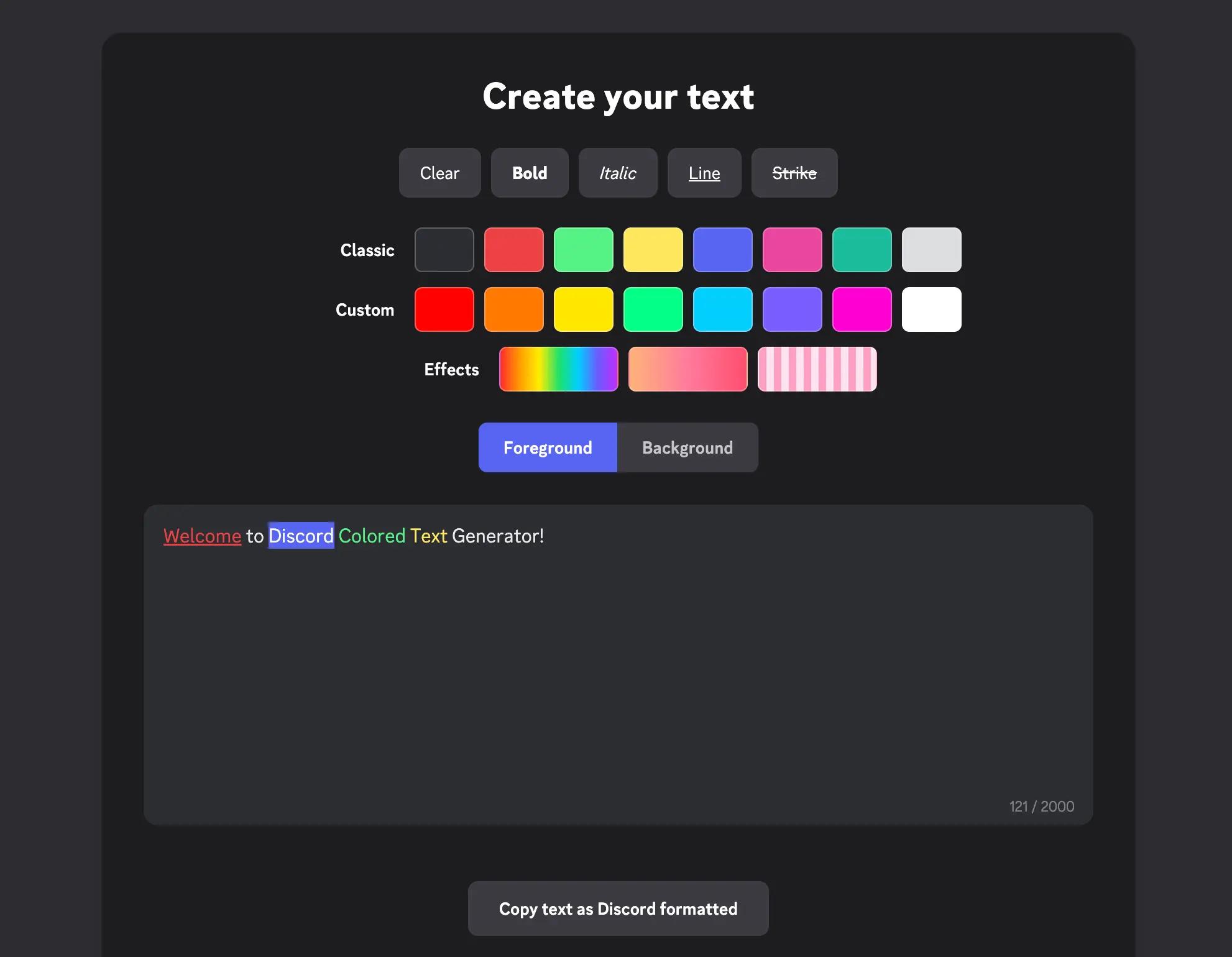
The generator: style buttons on top, three colour rows, then the live editor and the copy button.
- Open the Discord Colored Text Generator.
- Type or paste your message into the editor.
- Select the words you want coloured, then click a swatch.
- Press Copy text as Discord formatted.
- Paste into any Discord channel and send.
The copy button includes the ```ansi fence. That fence is not optional — copying only the inner text is the number one reason people see raw characters instead of colours.
Ready to try it? The generator shows a live character count, so you always know how much of Discord's 2000-character budget the codes are using.
Open the Colored Text GeneratorMethod 2 — Write the codes yourself
If you would rather hand-craft a message, the syntax is short and predictable. Open the block with three backticks plus ansi, then use these sequences:
```ansi
[2;31mRed text[0m
[2;32mGreen text[0m
[1m[2;33mBold yellow[0m
[2;44m[2;37mBlue highlight[0m
```
- Text colour —
[2;30mthrough[2;37m - Background —
[2;40mthrough[2;47m - Styles —
[1mbold,[3mitalic,[4munderline,[9mstrikethrough - Reset —
[0m, always at the end
Each bracket above stands in for the invisible ESC character. The full table — including hex values, 24-bit truecolor and combination examples — lives on the Discord ANSI color codes reference.
How to make rainbow text in Discord
Rainbow text is simply a gradient of 24-bit truecolor codes, one per character. Writing that by hand is impractical, so use the Effects row of the generator:
- Select the phrase you want painted.
- Click the rainbow swatch under Effects.
- Copy the block and send it.
Under the hood every character gets its own [38;2;r;g;bm sequence, which is why gradients eat through Discord's character limit much faster than a single flat colour. Keep rainbow text to a short phrase — a full sentence can blow past 2000 characters.
Colored text on Discord mobile
Modern Android and iOS clients render ANSI colours exactly like desktop does. On a phone the easiest route is to generate the block on desktop (or in your mobile browser), copy it, then long-press the Discord message box and choose Paste.
If a phone shows raw characters instead, it is almost always an outdated app — update Discord and the same message renders correctly.
Troubleshooting
I see strange characters instead of colours
The fence is missing. The message must begin with three backticks followed by ansi and end with three more. Always use the copy button so the fence comes along.
My message is too long to send
Escape sequences are real characters. A rainbow phrase costs roughly 20 characters per letter, so shorten the text or drop back to a single palette colour.
Italic or strikethrough is ignored
Those two styles depend on client version. Bold and underline work everywhere; if italic does not appear, everything else in the message still renders fine.
Colours vanished after forwarding
Some bridges and webhook relays strip escape characters. Paste the block directly into Discord rather than routing it through a third-party service.
Summary
Colored Discord text comes from ANSI escape codes inside a code block tagged ansi. You can write the codes yourself, or skip the invisible characters entirely and let a generator build the block for you. Either way it is free, needs no Nitro, and works on desktop, web and mobile.
- Discord Colored Text Generator — build and copy a finished block in seconds.
- Discord ANSI Color Codes reference — every code with copy-and-paste examples.
- Discord Font Generator — Unicode lettering for when style matters more than colour.